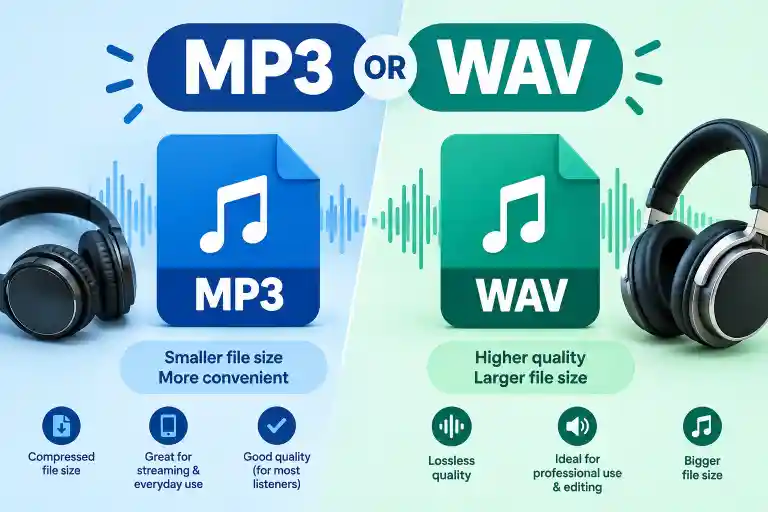
Choosing between MP3 and WAV depends on what you need the audio for. MP3 is a compressed format that creates much smaller files, while WAV usually stores uncompressed audio with higher fidelity and much larger file sizes.
For everyday listening, streaming, and sharing, MP3 is often more practical. For professional recording, editing, mixing, and mastering, WAV is generally preferred.
People often search for MP3 or WAV because both formats are widely used, but they serve different purposes.
Understanding the difference can help you choose the right format without sacrificing unnecessary storage space or audio quality.
MP3 or WAV: Quick Answer
MP3 is best when you want smaller files that are easy to store, share, or stream.
WAV is better when you need high-quality audio for editing, recording, mixing, or professional production.
| Feature | MP3 | WAV |
| Compression | Lossy | Usually uncompressed |
| File size | Small | Large |
| Audio quality | Good | Very high |
| Editing | Less ideal | Excellent |
| Streaming | Excellent | Less practical |
| Storage | Saves space | Uses more space |
| Professional production | Sometimes | Commonly preferred |
What Is MP3?
MP3 stands for MPEG-1 Audio Layer III and is one of the most widely recognized digital audio formats.
MP3 uses lossy compression to reduce file size. During compression, some audio information that is considered less noticeable to human hearing is removed.
This makes MP3 files much smaller than uncompressed audio files.
For example, a song stored as a WAV file may take considerably more storage space than the same recording encoded as an MP3.
Common Uses of MP3
MP3 is commonly used for:
- Music downloads
- Streaming and online audio
- Podcasts
- Audiobooks
- Voice recordings
- Mobile devices
- Social media
- Sharing audio online
If storage space and easy sharing are important, MP3 can be a convenient choice.
What Is WAV?
WAV, or Waveform Audio File Format, is an audio container format commonly associated with uncompressed PCM audio.
Unlike a typical MP3, an uncompressed WAV file preserves the recorded audio data without lossy compression.
This results in much larger files, but it makes WAV particularly useful for professional audio work.
Common Uses of WAV
WAV files are commonly used for:
- Studio recording
- Music production
- Audio editing
- Mixing
- Mastering
- Sound design
- Film and video production
- Professional voice recording
When you need to process an audio file repeatedly, starting with a high-quality WAV file can provide more flexibility.
MP3 vs WAV: Main Difference
The biggest difference between MP3 and WAV is how they store audio data.
MP3 uses lossy compression to make files smaller. WAV can store uncompressed PCM audio, resulting in much larger files.
MP3
A typical MP3 might use a bitrate such as 128 kbps, 192 kbps, 256 kbps, or 320 kbps.
Higher MP3 bitrates generally preserve more audio information and can sound better than lower-bitrate MP3 files.
WAV
WAV commonly stores uncompressed PCM audio at settings such as 44.1 kHz/16-bit or 48 kHz/24-bit, although WAV can support many other configurations.
The exact quality depends on the recording and settings, not simply the file extension.
MP3 or WAV: Which Has Better Quality?
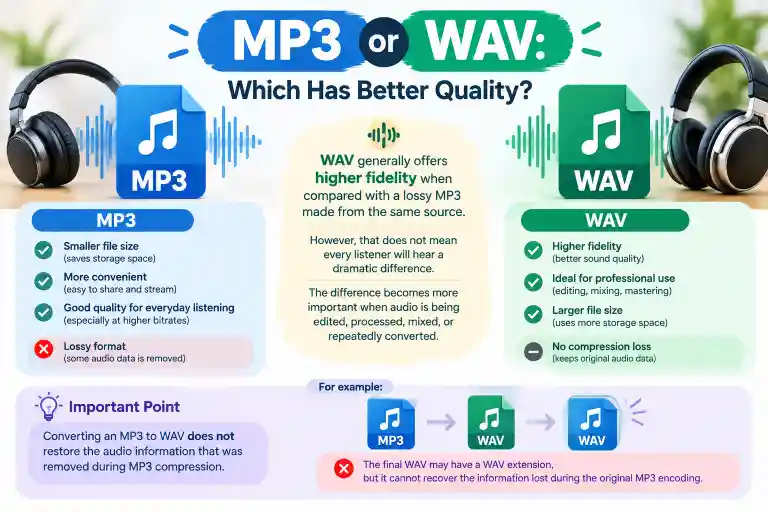
WAV generally offers higher fidelity when compared with a lossy MP3 made from the same source.
However, that does not mean every listener will hear a dramatic difference.
A high-bitrate MP3 can sound very good for everyday listening. The difference becomes more important when audio is being edited, processed, mixed, or repeatedly converted.
One important point is that converting an MP3 to WAV does not restore the audio information that was removed during MP3 compression.
For example:
WAV → MP3 → WAV
The final WAV may have a WAV extension, but it cannot recover the information lost during the original MP3 encoding.
MP3 or WAV: Which File Is Smaller?
MP3 files are much smaller than uncompressed WAV files.
This is one of the main reasons MP3 became popular for digital music and online distribution.
A three-minute song can take only a few megabytes as an MP3, while an uncompressed WAV version can require significantly more storage.
The exact size depends on:
- Duration
- Sample rate
- Bit depth
- Number of channels
- MP3 bitrate
- Compression settings
Therefore, there is no single file size that applies to every MP3 or WAV.
MP3 vs WAV for Music
For everyday music listening, MP3 is usually more convenient because it provides much smaller files.
For music production, WAV is generally more appropriate because producers often need high-quality source files for editing and processing.
Example
Imagine a musician recording a guitar track.
During production, the recording may be kept as WAV so it can be edited and mixed without starting from a lossy compressed source.
After the final mix is complete, an MP3 version can be created for convenient distribution or personal listening.
MP3 vs WAV for Podcasts
For podcast production, WAV is commonly useful during the recording and editing stages.
Once the episode is finished, a compressed format can be created for distribution.
This creates a practical workflow:
Record → Edit → Mix → Export → Compress for distribution
Keeping a high-quality master before compression gives the creator a better source for future versions.
MP3 vs WAV for Voice Recording
If you are simply recording a short voice memo, MP3 can be perfectly practical.
If the recording will be professionally edited, cleaned, mixed, or used in a larger production, WAV can provide a better starting point.
For example:
- Quick voice note → MP3
- Professional voice-over → WAV
- Podcast recording → WAV during production
- Final online distribution → MP3 or another appropriate delivery format
MP3 or WAV for Video Editing
For video production, WAV is frequently used for high-quality production audio.
Editors may need to adjust:
- Volume
- Equalization
- Noise reduction
- Compression
- Timing
- Dialogue levels
- Sound effects
Having a high-quality source gives the editor more flexibility.
For final delivery, the audio may be encoded according to the requirements of the video platform or production workflow.
Common Mistakes With MP3 or WAV
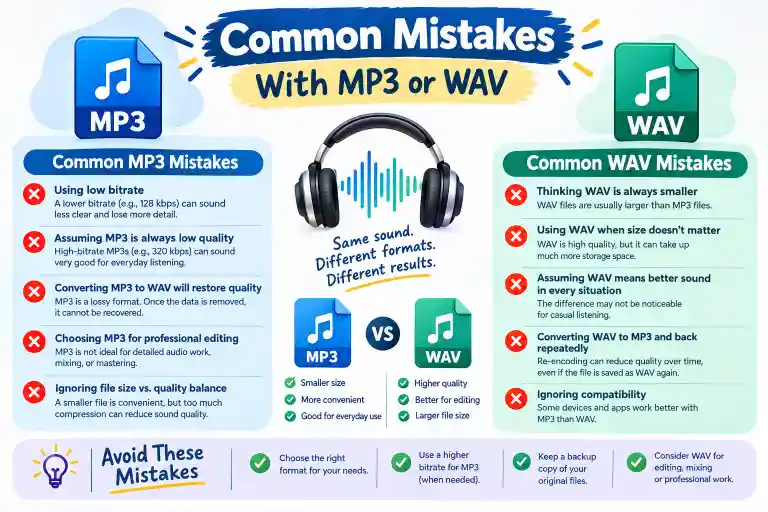
1. Thinking WAV is Always Better for Everything
WAV can provide higher-quality uncompressed audio, but its large file size makes it less convenient for everyday storage and sharing.
2. Converting MP3 to WAV and Expecting Better Quality
Converting an MP3 into WAV does not restore information lost during MP3 compression.
The file becomes larger, but the original lost data does not return.
3. Choosing MP3 for Professional Editing
MP3 can be edited, but lossy compression is not ideal as the starting point for repeated professional processing.
When available, an uncompressed or lossless source is usually preferable.
4. Assuming Every WAV Has the Same Quality
WAV is a container format. Audio quality depends on factors such as sample rate, bit depth, channels, and the original recording.
5. Focusing Only on File Extension
The extension alone does not tell you everything about audio quality.
A WAV created from a poor-quality source will not magically become high-quality simply because it has a .wav extension.
Everyday Examples of MP3 and WAV
Example 1: Listening to Music
I downloaded the song as an MP3 because it takes less storage space.
Example 2: Studio Recording
The engineer saved the recording as a WAV file for editing.
Example 3: Podcast Production
The podcast was recorded in WAV and converted to a smaller format for distribution.
Example 4: Sharing Audio
She sent the MP3 through the messaging app because the file was smaller.
Example 5: Audio Master
The producer kept the final WAV as a high-quality master file.
MP3 or WAV: Which Should You Use?
The right choice depends on your purpose.
Choose MP3 when:
- You need small files
- You are saving music for everyday listening
- You want easy sharing
- You are storing many audio files
- You are uploading audio where file size matters
- You are making a convenient listening copy
Choose WAV when:
- You are recording professionally
- You are editing audio
- You are mixing music
- You are producing sound effects
- You need a high-quality master
- You expect further audio processing
MP3 or WAV for Storage
If you have limited storage space, MP3 can make a major difference.
A large collection of uncompressed WAV files can consume substantial disk space, while MP3 versions require much less storage.
However, professionals often keep high-quality original or master files separately and create smaller compressed copies for everyday use.
A useful approach is:
Master files → WAV
Everyday listening copies → MP3
MP3 or WAV for Sharing Online
MP3 is generally more convenient for online sharing because of its smaller file size.
Smaller files can be:
- Uploaded faster
- Downloaded faster
- Stored more easily
- Shared more conveniently
WAV files can be appropriate when the recipient needs the highest-quality production source, but they are less convenient when bandwidth or storage is limited.
Quick Comparison: MP3 vs WAV
| Category | MP3 | WAV |
| Full name | MPEG-1 Audio Layer III | Waveform Audio File Format |
| Compression | Lossy | Commonly uncompressed |
| File size | Small | Large |
| Editing | Suitable for basic work | Excellent for production |
| Recording | Less ideal for masters | Common choice |
| Music listening | Very practical | Less storage-efficient |
| Professional production | Limited compared with uncompressed sources | Common |
| Sharing | Easy | Less convenient |
| Storage | Efficient | Requires more space |
| Audio preservation | Loses some information | Can preserve uncompressed PCM data |
Key Takeaways
- MP3 uses lossy compression and produces smaller files.
- WAV can store uncompressed audio and usually requires more storage.
- MP3 is convenient for everyday listening and sharing.
- WAV is commonly preferred for recording, editing, mixing, and mastering.
- Converting MP3 to WAV does not restore lost audio information.
- Audio quality depends on more than the file extension.
- The best format depends on how you plan to use the audio.
FAQs About MP3 or WAV
Is WAV better than MP3?
WAV can preserve uncompressed audio data, while MP3 uses lossy compression. WAV is therefore generally more suitable for professional editing and production, while MP3 is more convenient for everyday listening and storage.
Is MP3 or WAV better for music?
For everyday listening, MP3 is convenient because of its smaller size. For recording, editing, mixing, and mastering, WAV is commonly preferred because it can retain uncompressed audio data.
Does WAV sound better than MP3?
An uncompressed WAV made from a high-quality source can retain more audio information than a lossy MP3. However, a high-bitrate MP3 can sound very good, and many listeners may not notice a major difference in ordinary listening conditions.
Is WAV bigger than MP3?
Yes. Uncompressed WAV files are generally much larger than MP3 files because MP3 uses compression to reduce file size.
Can I convert MP3 to WAV?
Yes, you can convert an MP3 file to WAV. However, the conversion does not restore information already removed during MP3 compression.
Should I record audio in MP3 or WAV?
For professional recording and editing, WAV is generally the more appropriate choice. MP3 can be useful when small file sizes are more important than maximum editing flexibility.
Is MP3 good enough for everyday listening?
Yes. MP3 can provide good audio quality while using considerably less storage space than uncompressed WAV.
Which format is better for audio editing?
WAV is generally preferred for audio editing, especially when the recording will undergo substantial processing, mixing, or mastering.
Which format takes more storage?
WAV generally takes considerably more storage than MP3. The exact difference depends on the WAV settings and MP3 bitrate.
Does converting WAV to MP3 reduce quality?
Yes. When a WAV file is encoded as a lossy MP3, some audio information is discarded. The amount of perceptible difference depends on the MP3 encoding settings and the source material.
Conclusion
MP3 and WAV are both useful audio formats, but they are designed for different needs. MP3 focuses on efficient storage and convenient distribution, while WAV can preserve high-quality uncompressed audio for production and editing.
For music listening, sharing, podcasts, and saving storage space, MP3 is often a practical option. For recording, professional editing, mixing, and mastering, WAV is commonly used.
The important thing is not simply choosing the format with the larger file size. Instead, consider if you need convenience and compression or high-quality source audio for production.
In many workflows, both formats have a place: WAV can serve as the production or master file, while MP3 can be created as a smaller copy for everyday use.
Read More:
- Consol or Console: A Quick Fix for 2026 Writers
- Instalments or Installments: American vs British Spelling in 2026
- Master’s or Bachelor’s: The Decision That Shapes Your 2026 Career